

MTU size problems produce a distinct signature: small packets sail through while anything larger hangs, stalls, or drops silently. The fastest fixes are to confirm Path MTU Discovery is failing with a DF-enabled ping and tracepath, then either allow ICMP Type 3 Code 4 back to the sender or apply TCP MSS clamping at the tunnel or firewall edge. If both mitigations fail to resolve it, the problem likely sits deeper in an asymmetric path or a misconfigured overlay network.
TL;DR:
- MTU issues often go unnoticed until large packets stall or drop silently, especially when encapsulation or asymmetric paths are involved.
- Confirm Path MTU Discovery is failing by using DF-enabled ping and tracepath, then open ICMP Type 3 Code 4 traffic or clamp TCP MSS at network edges to resolve.
- Tunnels, VPNs, and PPPoE connections frequently reduce effective MTU, causing black holes if not properly adjusted or if ICMP is blocked.
- Use step-by-step diagnostics—DF ping, tracepath, and traffic captures—to identify where along the route the MTU limits occur.
- Always verify fixes with real traffic tests and consider balancing ICMP allowance with MSS clamping to maintain reliable connectivity.
Table of Contents
- Recognizing MTU Size Problems in the Wild
- How MTU, MSS, and Path MTU Discovery Actually Work
- Common Causes That Break PMTUD or Shrink Effective MTU
- Step-by-Step Diagnosis: Finding Where the Path Breaks
- Concrete Fixes and When to Apply Each One
- Platform Notes: Linux, Windows, IPv6, and Cloud Environments
- Operational Best Practices to Prevent Recurring MTU Problems
- Validating the Fix With Real Traffic, Not Just Pings
- Balancing ICMP Security With PMTUD Reliability
- Checking Your Fix Actually Worked
- Sources
- FAQ
Recognizing MTU Size Problems in the Wild
MTU trouble rarely announces itself with an error message. Instead, it shows up as a pattern engineers learn to recognize almost by feel: DNS lookups work, small HTTP requests load, then a page with large images stalls halfway through rendering. SSH sessions connect fine but freeze the moment you cat a large file or run a command with heavy output. File transfers over SCP or rsync crawl to a stop at a consistent byte offset, then time out.
This happens because small packets fit under every MTU along the path, while larger ones hit a bottleneck link and need fragmentation or a Path MTU Discovery response that never arrives.
Watch for these signals during triage:
- Small pings (under roughly 500 bytes) succeed, but larger ones with the DF flag set time out or vanish.
- Web pages load their HTML shell but stall on large images, video thumbnails, or bundled JavaScript.
- SSH or SFTP sessions connect and authenticate, then freeze on any command with substantial output.
- TCP retransmission counters climb steadily in
netstator monitoring dashboards without a matching rise in overall traffic. - One direction of a connection works fine while the reverse direction stalls, hinting at an asymmetric MTU limit.
A tcpdump capture during a stalled transfer usually shows the client retransmitting the same large segment repeatedly with no corresponding ICMP reply. That absence is the tell. If ICMP Type 3 Code 4 (Fragmentation Needed) messages were reaching the sender, Path MTU Discovery would adjust and recover on its own. When they never show up, PMTUD has hit what engineers call an MTU black hole.
How MTU, MSS, and Path MTU Discovery Actually Work
MTU is the largest packet size, in bytes, that a network link can carry without fragmenting it. Standard Ethernet caps this at 1,500 bytes, a figure that has held steady since the earliest LAN deployments and still governs most consumer and enterprise gear today.
MSS, the Maximum Segment Size, is the TCP payload size negotiated during the handshake. It excludes the IP and TCP headers, so the rough shortcut engineers use is MTU minus 40 bytes: a 1,500 byte MTU yields a 1,460 byte MSS under IPv4 with no extra options.
Path MTU Discovery figures out the smallest MTU along an entire route so a sender never transmits a packet too large for any hop to forward. It works by sending packets with the DF (Don't Fragment) bit set. If a router along the path can't forward that packet whole, it's supposed to drop it and send back an ICMP Type 3 Code 4 message, telling the sender to shrink its packets. RFC 1191 defines this behavior and recommends conservative fallback plateaus when a router's ICMP reply omits the next-hop MTU, letting the sender step down safely instead of guessing.
The trouble starts when a firewall or middlebox blocks that ICMP reply outright. The sender never learns to shrink its packets. It keeps retransmitting the same oversized segment, and the router keeps silently dropping it. That's the black hole.
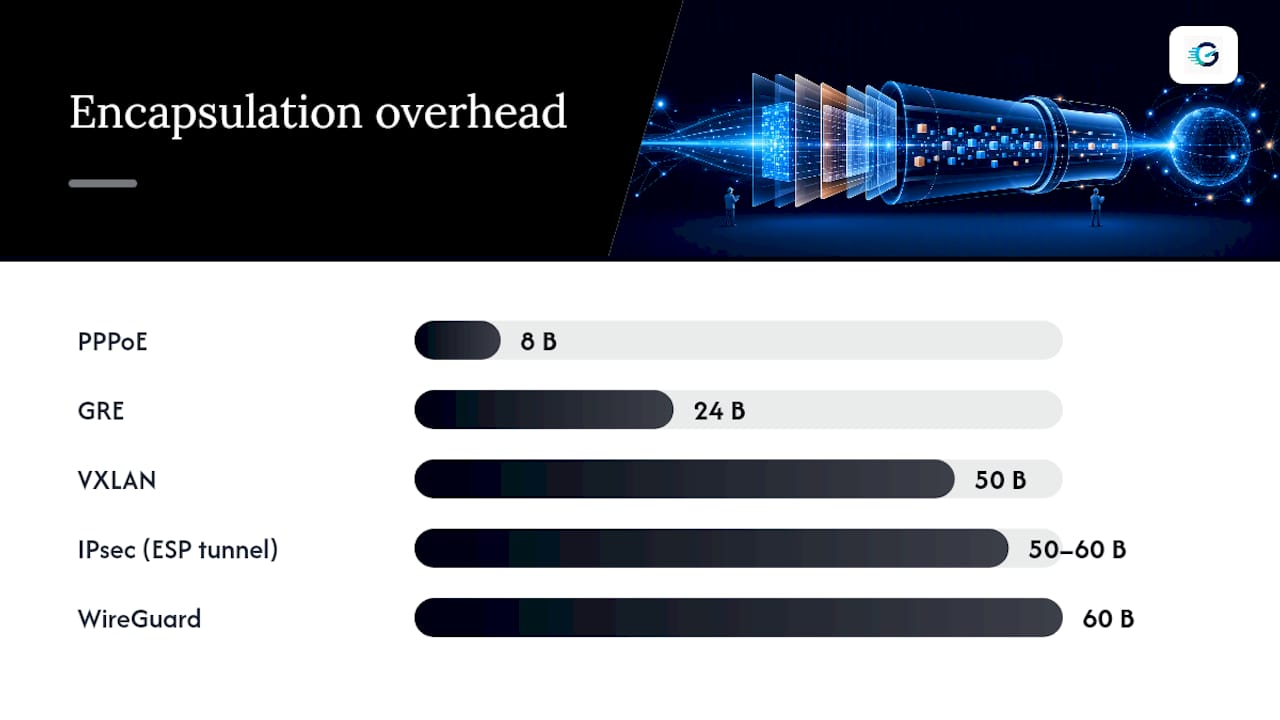
Encapsulation compounds the problem by consuming part of the MTU budget before your data ever gets sent:
| Encapsulation type | Typical overhead |
|---|---|
| GRE | 24 bytes |
| IPsec (ESP, tunnel mode) | 50 to 60 bytes |
| VXLAN | 50 bytes |
| PPPoE | 8 bytes |
| WireGuard | 60 bytes |
Jumbo frames raise MTU to a much higher value than standard Ethernet, but this requires every device on the path, including switches, NICs, and virtual interfaces, to support the larger size consistently. One misconfigured hop breaks the whole chain.
Common Causes That Break PMTUD or Shrink Effective MTU
Most MTU incidents trace back to one of a handful of repeat offenders, and recognizing the pattern early saves hours of packet chasing.
- Tunnels and VPNs. GRE, VXLAN, IPsec, and WireGuard all add encapsulation headers, and if the tunnel MTU isn't adjusted downward to compensate, oversized inner packets get dropped or fragmented unpredictably. Juniper's monitoring documentation flags this as one of the most common causes of reported MTU mismatches in production networks.
- PPPoE connections. Common on DSL and some fiber last-mile links, PPPoE trims 8 bytes off the usable MTU, and hosts that assume a flat 1,500 byte path routinely hit black holes on these links.
- Firewalls and middleboxes blocking ICMP. Overzealous security policies that drop all ICMP traffic, rather than filtering selectively, are the single most preventable cause of PMTUD failure.
- Asymmetric paths. Traffic that flows differently in each direction can hit different MTU limits per direction, so a connection that works when initiated one way fails when initiated the other.
- Partial jumbo frame rollouts. Enabling 9,000 byte frames on some switches but not others creates a mismatch that behaves exactly like a smaller-scale PMTUD failure.
Step-by-Step Diagnosis: Finding Where the Path Breaks
Work through this sequence in order. Each step narrows the search space before you touch a single configuration file.
- Send a DF-enabled ping with a known payload size. On Linux,
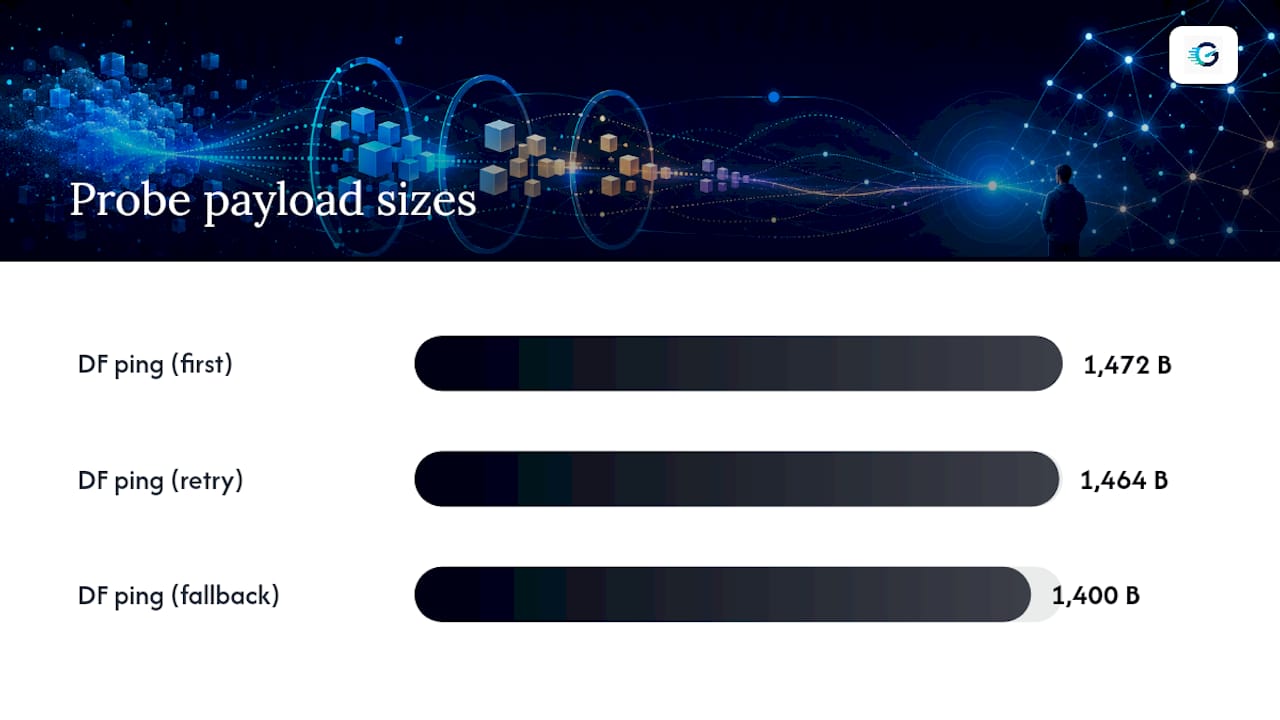
ping -M do -s 1472 8.8.8.8sends a 1,472 byte payload (1,500 total with headers) and refuses fragmentation. If it fails, drop the payload size incrementally (1,472, then 1,464, then 1,400) until you find the largest size that succeeds. That number tells you the effective MTU somewhere along the path. - Run tracepath to map per-hop MTU.
tracepath 8.8.8.8reports the path MTU at each hop and flags where it drops. This is faster than binary-searching with ping alone and often points straight at the offending device. - Capture traffic with tcpdump during a failed transfer.
tcpdump -i eth0 icmp or tcp port 22while reproducing the stall shows whether retransmissions are happening with zero ICMP replies coming back, which confirms a black hole rather than genuine packet loss. - Check firewall rules for ICMP Type 3 Code 4. Review both the local host firewall and any upstream security appliances. A rule set that blocks "all ICMP" instead of specific types is the usual culprit.
- Test both directions separately. Initiate the connection from each endpoint in turn. Asymmetric failures that only appear in one direction almost always point to a mismatched tunnel or bridge MTU on one side of the path, not a symmetric routing issue.
This workflow, DF probe, tracepath, ICMP check, then targeted mitigation, mirrors the standard PMTUD troubleshooting sequence that most production runbooks converge on, and it minimizes guesswork about whether you're looking at ICMP filtering or a genuinely smaller MTU.
Pro Tip: Keep a small table of "known good" payload sizes for your common destinations (VPN concentrator, cloud VM, CDN edge). When something breaks, you'll immediately know whether the effective MTU dropped from its usual value instead of starting the whole diagnosis from scratch.
Concrete Fixes and When to Apply Each One
Once you've confirmed where PMTUD breaks, the fix depends on how much control you have over the path.
Allow ICMP Type 3 Code 4 wherever you control the firewall. This is the most correct fix because it restores PMTUD's ability to self-correct for every connection, not just TCP. If your security policy blocks ICMP broadly, carve out an exception for Fragmentation Needed specifically rather than opening all ICMP types.
Apply TCP MSS clamping when you can't guarantee ICMP delivery end to end. This is the standard fallback at tunnel edges and VPN gateways where you don't control every hop upstream. Two common iptables approaches:
iptables -t mangle -A FORWARD -p tcp --tcp-flags SYN,RST SYN -j TCPMSS --clamp-mss-to-pmtuautomatically clamps MSS to the actual discovered path MTU.iptables -t mangle -A FORWARD -p tcp --tcp-flags SYN,RST SYN -j TCPMSS --set-mss 1400sets a fixed value when you know the tunnel overhead precisely and want predictable behavior.
MSS clamping works by rewriting the SYN packet's advertised MSS before the three-way handshake completes, so neither peer ever negotiates a segment size the tunnel can't carry whole. It's frequently the more robust fix precisely because it doesn't depend on any ICMP message surviving the round trip.
Lower the interface or tunnel MTU directly when you control both endpoints. Subtract your encapsulation overhead from 1,500 (WireGuard: 1,500 minus 60 equals 1,440) and set that value on both ends with ip link set dev wg0 mtu 1440.
Avoid jumbo frames unless every device on the path supports them. Partial rollouts cause more incidents than they solve.
After any change, verify with the same DF-enabled ping and tracepath commands you used to diagnose the problem, then confirm application behavior (large file transfer, full page load) completes cleanly.
Platform Notes: Linux, Windows, IPv6, and Cloud Environments
Linux gives you the most direct control. ip link set dev eth0 mtu 1400 changes an interface MTU immediately, and iptables -t mangle handles MSS clamping as shown above. Check current kernel PMTU cache entries with ip route show cache.
Windows requires changing MTU through netsh interface ipv4 set subinterface per adapter, and Windows Firewall's default ICMP rules sometimes block Fragmentation Needed messages unless you explicitly permit "Echo Request" and related ICMPv4 exceptions.
IPv6 has no in-network fragmentation at all. Routers that can't forward an oversized packet must drop it and send ICMPv6 Packet Too Big, making PMTUD stricter and ICMPv6 filtering even more damaging than on IPv4.
Containers, hypervisors, and cloud VMs need matching MTU across the host NIC, the VM's virtual interface, and any overlay network (Docker bridges, Kubernetes CNI plugins, VXLAN fabric). A mismatch anywhere in that chain reproduces the exact black hole symptoms described earlier, even inside an all-cloud environment.
Operational Best Practices to Prevent Recurring MTU Problems
The cheapest MTU fix is the one you never have to make twice. A few habits keep it from becoming a recurring fire drill:
- Document the expected MTU for every tunnel type, VPN, and overlay network in your environment, including the overhead subtracted for each encapsulation type in your IT network optimization efforts (IT Network Optimization for Oklahoma Small Business).
- Monitor interface counters for Oversized Frames or MRU violations and alert on sudden spikes, since these counters reliably flag mismatches before users start filing tickets.
- Add a DF-enabled path check to every incident playbook that touches connectivity or throughput complaints, so it's a five-minute first step rather than a last resort.
- Default to MSS clamping at network edges you control, and verify behavior with real traffic immediately after any tunnel or firewall change.
Pro Tip: If you manage multiple sites or tunnel endpoints, standardize on one MSS clamp value across the fleet rather than tuning each tunnel individually. Consistency here saves far more debugging time than a few extra bytes of payload ever will.
Validating the Fix With Real Traffic, Not Just Pings
Packet-level tools confirm that PMTUD is working again, but they don't tell you whether streaming, VoIP, or large file transfers actually feel right to the person on the other end. That's where end-to-end measurement earns its place in the workflow.
- Run a streaming quality test before and after an MTU or MSS change and compare packet loss, jitter, and throughput side by side.
- A jump in packet loss or jitter right after a tunnel MTU change, even when DF pings succeed, often means the new MTU value is technically valid but still too aggressive for the actual link.
- Save test history and pair it with your tcpdump captures so postmortems have both the packet-level evidence and the application-level impact in one place.
- Repeat the same test recipe (DF probe, tracepath, then a throughput check) any time you touch tunnel or interface MTU settings, so results stay comparable across incidents.
Balancing ICMP Security With PMTUD Reliability
Blanket ICMP filtering is one of the more common self-inflicted networking failures out there. Security teams block "all ICMP" to reduce attack surface, then spend weeks chasing mysterious stalls that trace straight back to that same rule.
The better approach: allow Fragmentation Needed and Packet Too Big messages specifically, rather than ICMP wholesale, whenever you control the firewall. Reach for MSS clamping only when you genuinely can't guarantee ICMP survives the full round trip, such as traffic crossing a third-party network you don't manage.
Before locking down ICMP, ask whether you control every hop, whether MSS clamping is already in place as a fallback, and whether your monitoring would even catch a black hole if one opened tomorrow.
— Peter D
Checking Your Fix Actually Worked
Fixing an MTU mismatch on paper doesn't guarantee it's fixed for the people actually using your network. This platform measures metrics that indicate whether an MTU or MSS change genuinely improved things: packet loss, jitter, throughput, and the maximum live stream resolution your current connection can sustain.
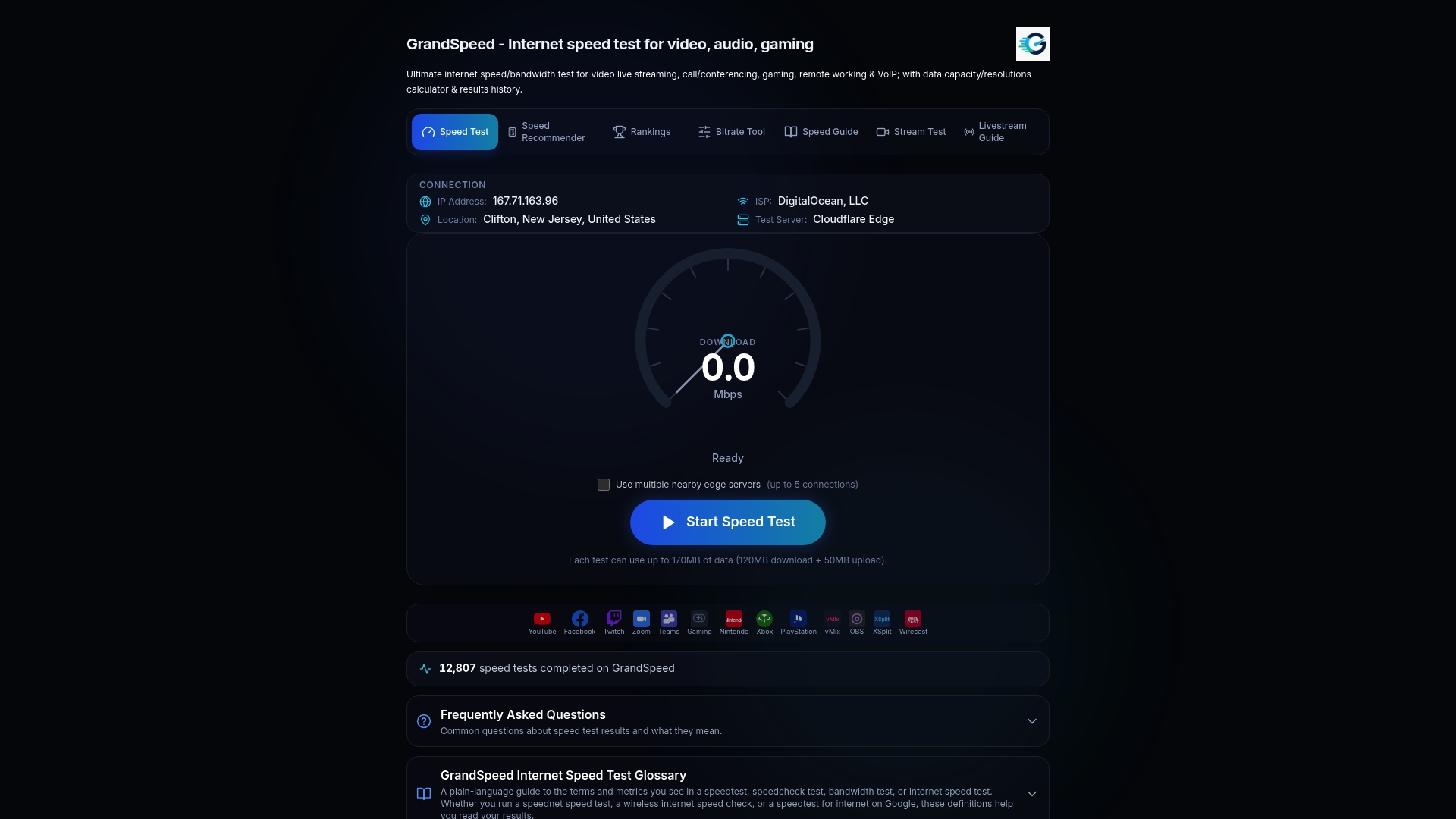
Run a speed test before and after any tunnel or interface change to catch regressions that a DF-enabled ping alone won't reveal. If you're troubleshooting a connection that's meant to carry live video or broadcast traffic, the streaming quality test goes further, estimating supported resolution alongside jitter and packet loss so you can tell whether your MSS clamp value is actually holding up under real load. By keeping test history, you can line up a before-and-after comparison directly against the timestamp of your configuration change, which turns a "seems better" impression into evidence you can drop straight into an incident writeup. Run the test now and keep the results on hand for your next postmortem.
FAQ
Should MTU Be Set to 1500 or 1492?
Use 1,500 for standard Ethernet connections. Use 1,492 on PPPoE links, where 8 bytes of encapsulation overhead reduces the usable MTU from the Ethernet default.
How Do I Fix MTU Size Problems?
Confirm PMTUD is failing with a DF-enabled ping and tracepath, then allow ICMP Type 3 Code 4 through your firewall if you control it, or apply TCP MSS clamping at the tunnel edge if you don't. Verify the fix with a follow-up throughput and streaming test, such as Grandspeed's stream test, to confirm the change actually improved real traffic.
What Should MTU Size Be Set To?
For a standard Ethernet link, 1,500 bytes is correct. For tunnels and VPNs, subtract the encapsulation overhead (commonly 24 to 60 bytes depending on the protocol) from 1,500 to get the correct tunnel interface MTU.
What Does Changing MTU From 1400 to 1500 Do?
Raising MTU from 1,400 to 1,500 increases the maximum packet size the interface will send without fragmentation. If any hop along the actual path can't carry a full 1,500 byte packet, that change can reintroduce black hole symptoms that a lower, more conservative MTU had been avoiding.