

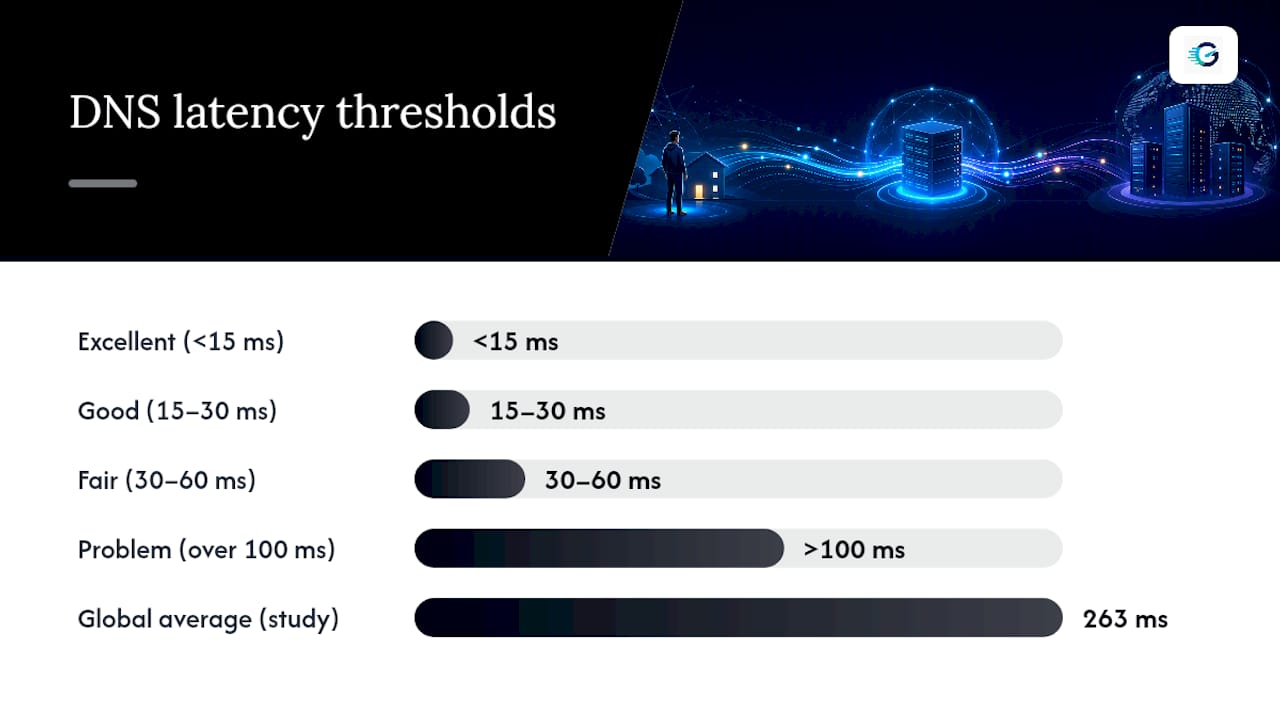
DNS latency is the time between your device sending a DNS query and getting the answer back, measured in milliseconds. Anything under 15 ms is excellent, 15 to 30 ms is good, 30 to 60 ms is fair, and anything creeping past 100 ms on an uncached lookup starts to hurt page loads. The only way to know where you stand is to test from your own network, since the same resolver performs differently depending on where you sit.
TL;DR:
- DNS response times vary significantly by location due to Anycast routing and cache state, affecting how quickly queries are resolved regionally.
- A cached DNS query can be almost instantaneous, while cache misses involving authoritative servers can cause major delays, especially if routing or network issues exist.
- Testing from your own network with tools like
digand browser-based DoH benchmarks provides accurate insights into whether DNS latency is your real bottleneck.- Fixing high DNS latency often involves clearing local caches, optimizing resolver choice, or adjusting DNS TTLs; switching resolvers only helps if the recursive resolver is the actual source of delay.
- Average DNS response times across websites are around 263 ms, but ideal performance for most users is under 30 ms, with anything above 100 ms indicating a problem worth addressing.
Table of Contents
- What Does DNS Latency Actually Measure?
- Why Does DNS Latency Vary So Much by Location?
- How Is DNS Latency Actually Measured?
- How Do You Test DNS Latency From Your Own Network?
- How Do You Diagnose and Fix High DNS Latency?
- How Does GrandSpeed Measure DNS Latency?
- When Switching DNS Resolvers Helps, and When It Won't
- Check Your Own DNS Latency Right Now
- Where to Learn More About DNS Performance
- Sources
- FAQ
What Does DNS Latency Actually Measure?
DNS latency isn't one number. It's a chain: your device asks a recursive resolver, and if that resolver doesn't already have the answer cached, it has to go ask an authoritative server somewhere else on the internet. End-to-end latency covers that whole round trip. Resolver-only latency covers just the first leg, client to recursive resolver, and it's almost always faster because it skips the authoritative hop entirely.
Why does this matter beyond curiosity? A modern web page rarely loads from one domain. Fonts, ad networks, analytics scripts, and CDN assets each trigger a separate DNS lookup, so a small per-query delay compounds fast across a dozen third-party domains.
LogicMonitor's research on DNS performance lays out the thresholds most engineers use as a baseline:
- Under 15 ms: excellent, effectively invisible to the user
- 15 to 30 ms: good, no noticeable impact
- 30 to 60 ms: fair, borderline on latency-sensitive apps like gaming or video calls
- Over 100 ms on an uncached query: a real problem worth investigating
Pro Tip: A 2024 global study by Catchpoint and IBM found the average DNS response time across 2,271 websites was 263 ms, and self-hosted DNS ran about 35% slower than that average. If your own site's DNS feels sluggish, self-hosting might be the reason.
Why Does DNS Latency Vary So Much by Location?
Most public DNS providers use Anycast routing, which announces the same IP address from data centers scattered around the world and lets your traffic land at whichever one is closest. That's efficient in theory, but it means the resolver that's fastest for someone in Chicago might route through a slower path for someone in Lisbon. Anycast behavior is inherently local, which is exactly why a resolver benchmark from a friend's connection doesn't tell you much about yours.
Cache state matters just as much as geography. A cache hit means the resolver already has the answer stored and can reply almost instantly. A cache miss forces it to walk the delegation chain out to the authoritative servers, and Google's Public DNS documentation identifies cache misses as one of the dominant causes of latency spikes in real-world traffic.
Beyond caching, several network-level factors shape your results:
- Routing and BGP peering arrangements between your ISP and the resolver's network
- Packet loss on congested links, which forces retransmissions
- VPNs, which add an extra hop and often reroute DNS traffic through a distant exit node
- ISP-level DNS handling, including transparent proxying that can silently redirect queries
How Is DNS Latency Actually Measured?
Comparing DNS numbers across tools or articles only works if everyone agrees on what they're measuring. An IETF draft on DNS latency measurement proposes breaking the process into three timing components, often labeled TC1, TC2, and TC3:
- Client to recursive resolver (TC1): the round trip between your device and your configured DNS resolver
- Recursive processing time (TC2): how long the resolver takes to check its cache and decide what to do next
- Recursive to authoritative (TC3): the extra round trip only triggered on a cache miss
Reporting which scope a number belongs to changes everything. A "12 ms" DNS result from a browser tool measuring TC1 alone means something completely different from a "12 ms" result covering the full uncached chain.
Good methodology also means running a warm-up query first (and discarding it), then firing several timed queries at unique, uncached hostnames, and reporting the median rather than the average, since a single slow outlier can distort a mean badly.
| Pitfall | Why it skews results |
|---|---|
| Comparing cached vs. uncached results | Cached lookups can be significantly faster and aren't representative |
| Using average instead of median | One network blip inflates the average disproportionately |
| Testing from one location only | Anycast routing means results don't generalize elsewhere |
| Ignoring transport (UDP vs. DoH/DoT) | Encrypted transports add overhead that raw UDP doesn't have |
How Do You Test DNS Latency From Your Own Network?
Numbers only mean something when they come from your own connection, not a lab somewhere else. Here's a sequence that gets you a usable read in a few minutes.
-
Run a browser-based DoH benchmark first. These tools warm up the connection, then fire multiple DNS-over-HTTPS queries to unique, uncached hostnames to rank resolvers relative to each other from your exact location. Expect DoH numbers to run a bit higher than raw UDP because of the added encryption overhead, but the relative ranking between resolvers still holds.
-
Use
digfor a direct, low-level read. Rundig example.comand check theQuery timefield in the output. That's your resolver-only latency for that specific lookup. -
Run
dig +trace example.comto see the full delegation path. This walks the query from the root servers down through each delegation hop to the authoritative server, showing you exactly where time gets spent. -
Check the underlying network with
pingandtraceroute. If DNS is slow but the network path to the resolver itself looks clean, the resolver or the authoritative side is the likely culprit, not your connection. -
Repeat each test five to ten times, discard the first result as a warm-up, and take the median. Testing guidance from DNS Robot recommends this exact pattern because a single query can be thrown off by a random retransmit or a brief congestion spike.
Pro Tip: If dig reports a fast query time but page loads still feel slow, check whether your browser is using DNS-over-HTTPS with a different resolver than your system settings. The two can disagree, and DoH overhead sometimes explains a gap that looks unexplained at first.
How Do You Diagnose and Fix High DNS Latency?
Work through fixes from simplest to most involved, and stop as soon as the problem clears.
- Flush your local DNS cache (
ipconfig /flushdnson Windows,sudo dscacheutil -flushcacheon macOS) in case a stale or corrupted entry is the culprit. - Check your router and device DNS settings for a misconfigured or overloaded resolver, especially if your ISP's default DNS has been flaky.
- Benchmark two or three resolvers from your own network and swap temporarily to compare, rather than assuming a name-brand resolver will automatically win in your location.
- If you manage a domain, review your TTLs, delegation hops, and authoritative server placement. Large-scale comparisons consistently find that managed DNS providers outperform self-hosted setups on raw latency, mostly due to broader server footprints and more aggressive caching.
- Escalate to your ISP or host only after you've confirmed the network path itself is clean with
tracerouteand ruled out packet loss.
Pro Tip: For DNS reference material and record-type lookups while you diagnose, Pingfloat's DNS reference is a solid quick-check for delegation and record behavior.
How Does GrandSpeed Measure DNS Latency?
GrandSpeed's speed test reports DNS resolution time alongside jitter, packet loss, and bufferbloat, so you're not looking at DNS in isolation from the rest of your connection. Tests run client-side, which preserves your actual local network context instead of routing through a remote lab that would mask the Anycast and peering effects that shape real results.
Test history lets you track whether a fix actually worked over time, and the results map directly to practical use: a DNS lag that seems minor in isolation can still stall stream startup or introduce lag spikes during a competitive match.
When Switching DNS Resolvers Helps, and When It Won't
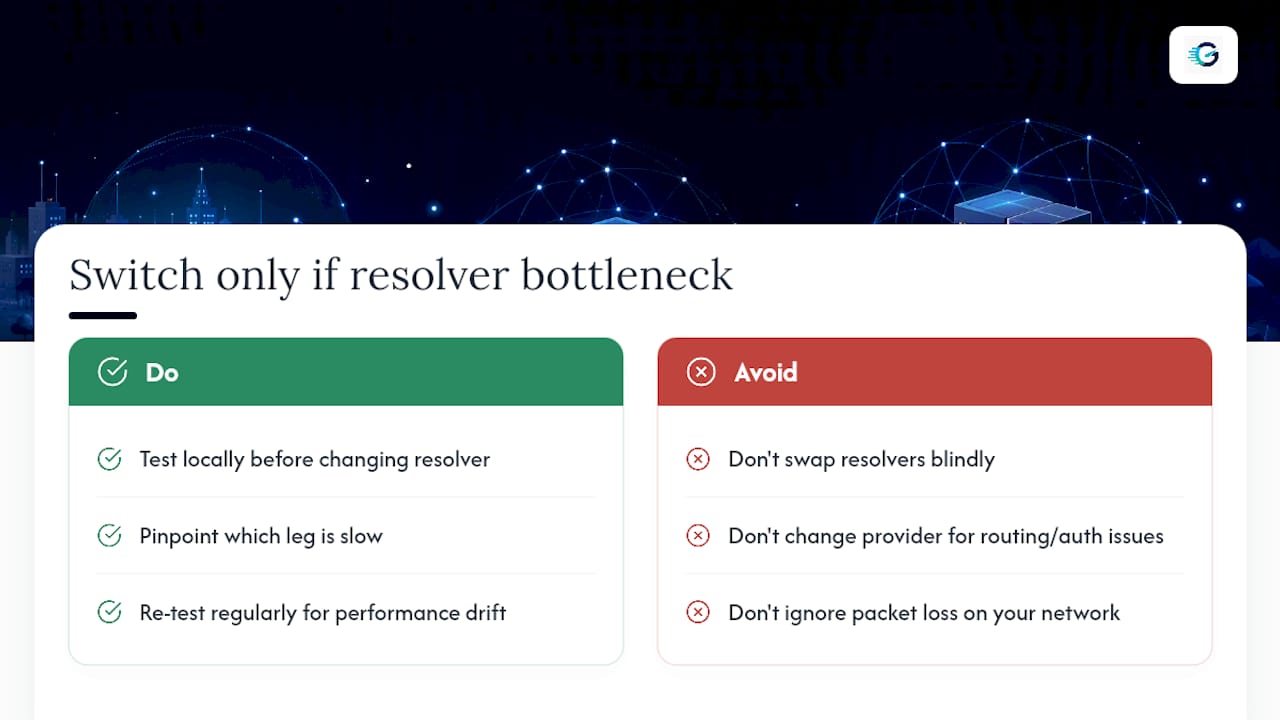
Swap resolvers is the first fix most people reach for, and sometimes it works. But it only helps when the recursive resolver itself is the bottleneck. If your slowness comes from authoritative server placement, a packet loss issue on your own network, or your ISP's routing to any resolver, changing providers just moves the same problem somewhere else.
Test locally before you touch anything. Figure out whether the delay sits on the client to recursive leg or the recursive to authoritative leg, since that distinction tells you what's actually worth fixing. Then keep testing on a routine basis. DNS performance drifts as ISPs change peering arrangements and providers adjust their networks, so last year's fast resolver isn't guaranteed to be this year's fast resolver.
*— Peter D
Check Your Own DNS Latency Right Now
Every fix in this guide starts with a real number from your own connection, not a benchmark run somewhere else. GrandSpeed's free speed test measures DNS resolution time right alongside jitter, packet loss, and bufferbloat, so you can see whether DNS is actually your bottleneck or just one piece of a bigger picture.
If streaming or live broadcasting is what's suffering, the Video Streaming Quality Test breaks down how your connection handles the specific demands of video delivery, including the maximum resolution your current speeds can realistically support. Run the test, save it to your history, and rerun it after any change, whether that's a new resolver, a router update, or a call to your ISP, so you know for certain whether it actually helped.
Where to Learn More About DNS Performance
For deeper reading, the Catchpoint and IBM global DNS study covers real-world benchmarks across thousands of sites. The IETF DNS latency measurement draft lays out the formal timing-component model referenced throughout this guide. LogicMonitor's deep dive covers troubleshooting in more technical depth, and Google's Public DNS performance docs explain caching behavior from the resolver operator's side. For hands-on testing, dig, dig +trace, traceroute, and a browser-based DNS speed test cover nearly every diagnostic scenario you'll run into.
Sources
- DNS Latency Measurement (IETF draft)
- Slow DNS: Understanding DNS Performance Best Practices and Troubleshooting - LogicMonitor
FAQ
Why Is My DNS Latency So High?
High DNS latency usually comes from a cache miss forcing a trip to the authoritative server, a poor routing path to your resolver, or packet loss on your local network. Run dig +trace to see exactly which hop in the delegation chain is adding the delay.
Is 1.1.1.1 the Fastest DNS Resolver?
Not universally. Anycast routing means the fastest resolver depends on your location and your ISP's peering arrangements, so one provider might win in one city and lose in another. Test resolvers from your own network before assuming any single provider is fastest for you.
Does 8.8.8.8 Make Your Internet Faster?
Switching to a public DNS resolver can lower DNS latency if your current resolver is the bottleneck, but it won't fix issues rooted in packet loss, authoritative server delays, or your broader network path. Run a speed test before and after switching to confirm it actually helped.
Is 8.8.8.8 or 1.1.1.1 Better?
Neither is definitively better everywhere, since both rely on Anycast networks whose performance shifts by region and peering. The only reliable way to decide is benchmarking both from your own connection and comparing median response times over several runs.
What Counts as Good DNS Latency?
Under 15 ms is excellent, 15 to 30 ms is good, and 30 to 60 ms is still acceptable for most everyday browsing. Anything consistently over 100 ms on uncached lookups is worth investigating further.