

For the clearest picture of your connection, we recommend running GrandSpeed's Speed Test, which reports download, upload, latency, jitter, packet loss, bufferbloat, and DNS resolution time in one pass. It runs in any modern browser, with no sign-up required. That combination matters because streaming, gaming, and video calls depend on more than raw speed.
TL;DR:
- Testing on Ethernet provides more reliable results, especially for DSL and when troubleshooting home network issues.
- Latency under 50 milliseconds and packet loss below 1% are essential benchmarks for stable video calls and online gaming.
- Speed can fluctuate due to device age, Wi-Fi standards, router placement, ISP routing, and network congestion, not just your internet plan.
- GrandSpeed's test measures bufferbloat, packet loss, DNS resolution, and connection trends to give a more accurate view of real streaming and gaming performance.
- For best results, run multiple tests at different times, document findings thoroughly, and compare wired against Wi-Fi to identify the source of speed issues.
Table of Contents
- What counts as good internet speed for streaming, gaming, and calls
- How to run a correct speed test
- Why your measured speed keeps changing
- How to read your results: download, upload, latency, jitter, and packet loss
- Not getting the speed you pay for? Here's what to do
- What GrandSpeed measures beyond basic throughput
- Testing DSL, fiber, cable, and mobile connections correctly
- When a quick check beats a deep diagnostic
- Run GrandSpeed's Speed Test or Stream Test
- FAQ
- Sources
What counts as good internet speed for streaming, gaming, and calls
A single download number tells you little about whether a connection actually works for the task at hand. Streaming a 4K show, hosting a video call, and playing a fast-paced online game each stress a connection differently, and the gap between "fast enough" and "frustrating" usually comes down to latency and jitter rather than download speed alone.
- HD streaming typically needs moderate download speeds; 4K streaming generally requires significantly higher speeds per stream.
- Video calls need modest download and upload speeds with low latency and jitter to keep audio and video in sync.
- Online gaming is most sensitive to latency and jitter: spikes cause rubber-banding and lag even when download speed looks fine.
- Whole-home use with multiple streams, calls, and devices running at once calls for higher combined bandwidth, often quite high depending on household size.
Upload speed matters more than most people assume. Live broadcasting, cloud backups, and video calls all push data outward, so a connection with fast download but weak upload can still stutter on a Zoom call or a Twitch stream.
How to run a correct speed test
A single test on a busy Wi-Fi network can mislead you. Follow a short checklist to get numbers you can actually trust.
- Connect by Ethernet when possible; this removes Wi-Fi variability from the measurement.
- If you must test on Wi-Fi, stand close to the router and avoid walls or floors between you and it.
- Close background apps and pause downloads, cloud backups, or streams on other devices during the test.
- Run the test several times, including during evening peak hours, and look at the average rather than a single result.
- Let the tool pick the nearest server automatically. Server distance affects latency readings, and comparing results against different servers produces inconsistent numbers; for details, see Comece pelo LCP: otimize a velocidade do site para gestores e donos.
The 2022 FCC Speed Test App technical description notes that tests should select a server by the lowest round-trip time and keep that same server for an entire test sequence, which reduces variance from routing differences.
Pro Tip: Run one test right after waking your router and another 30 minutes later; a big gap usually points to local network congestion rather than your ISP.
Why your measured speed keeps changing
Speed test results swing for reasons that have nothing to do with a bad connection. Knowing what is in your control and what is not saves time before you call anyone.
- Device and router age, older Wi-Fi standards, and distance from the router all cap what you will see, even on a fast plan.
- ISP routing and peering decisions, plus peak-hour congestion, can slow throughput regardless of your home setup.
- Burst or "PowerBoost" style provisioning can show a fast number for the first few seconds of a test, then settle lower on a sustained download.
- Test server distance and load vary between tools, so two speed tests run back to back can report different numbers for the same connection.
- Mesh systems and Wi-Fi extenders add hops that can lower throughput and raise latency compared with a direct connection to the main router.
The Measuring Broadband America program addressed this by using dedicated Whitebox devices that run scheduled tests and validate service tiers directly with ISPs, removing many of the end-user variables that affect software-based tests run from a laptop or phone.
How to read your results: download, upload, latency, jitter, and packet loss
Each metric on a results page answers a different question about your connection, and reading them together tells you more than any single number.
- Download and upload (Mbps) measure raw capacity, the ceiling on how fast data moves in each direction.
- Latency (ping, in milliseconds) measures delay, and it is the metric that makes or breaks gaming and VoIP calls.
- Jitter measures how much latency varies from one moment to the next; high jitter causes choppy audio even when average latency looks fine.
- Packet loss measures how much data never arrives; even small amounts disrupt real-time audio and video.
A good benchmark for interactive calls is latency under 50 milliseconds and packet loss under 1%, the thresholds where most VoIP and video conferencing stays stable.
Cloudflare's measurement work on loaded latency, also called bufferbloat, found that latency under load, jitter, and packet loss matter as much as throughput for activities like gaming, streaming, and video conferencing, which is why its own Speed Test reports an aggregated score built from those metrics rather than peak throughput alone.
Sustained throughput over 25 to 30 seconds tends to be more representative of real downloads than a short burst reading, which can be inflated by temporary ISP acceleration. Treat any single test as a data point, not a verdict: compare several runs across different times of day before drawing a conclusion.
Not getting the speed you pay for? Here's what to do
Before contacting your ISP, gather evidence that makes the conversation shorter and more productive.
- Reboot your modem and router, then test again on a wired connection to rule out Wi-Fi as the cause.
- Isolate devices: turn off other gadgets pulling bandwidth, then retest to see if the number changes.
- Run comparative tests at different times of day and, where possible, on different servers to spot patterns.
- Document everything: screenshots, timestamps, and an average of at least five tests carry far more weight than one screenshot.
- Escalate once you have a pattern. Persistent low speeds paired with high latency or packet loss across multiple tests and times of day often point to an ISP-side or backbone issue rather than anything in your home.
Our own speed guide walks through common gaps between advertised and measured speeds if you want a deeper comparison before that call.
What GrandSpeed measures beyond basic throughput
We built our Speed Test to go past a download and upload number. It reports bufferbloat, packet loss, DNS resolution time, and it keeps a running history of past tests so you can spot trends instead of guessing from memory. One output unique to our platform: we calculate the maximum live stream or broadcast resolution your current connection actually supports, which turns a raw Mbps figure into a decision you can act on.
That matters because a number on a page does not tell you what bitrate to set in OBS or which encoder preset to pick. Our bitrate calculator converts your measured speed directly into a recommended streaming bitrate, and our streaming optimization guide walks through encoder choices based on those results. Every test runs in-browser on any modern device, with saved history so you can compare wired and Wi-Fi performance over time.

Testing DSL, fiber, cable, and mobile connections correctly
Connection type changes what a "good" result looks like and how you should test it.
DSL runs over copper phone lines and is highly distance-sensitive: speeds drop the farther you are from the provider's central office. Test on Ethernet where possible, since DSL's lower ceiling makes Wi-Fi overhead more noticeable.
Cable connections share bandwidth with neighbors on the same local loop, so speeds often dip during evening peak hours. Testing at multiple times of day is especially useful here to see how much congestion affects your service.
Fiber typically delivers the most consistent speeds with low latency, since it is less prone to the burst behavior seen on cable. If a fiber connection shows big swings between tests, the cause is more often local Wi-Fi or device limitations than the line itself.
Mobile (cellular) speeds vary by signal strength, network congestion, and whether you're on a current 5G standard or falling back to 4G. Test in the location you actually use your phone or hotspot, not just wherever signal happens to be strongest, and run several tests since cellular readings swing more than fixed-line connections.

For any connection type, our Internet/ISP Speed Recommender helps match your measured results against the tier that fits your household size and usage.
When a quick check beats a deep diagnostic
Routine quick checks are enough for day-to-day peace of mind, but before a big stream, a client call, or any event where a dropped connection costs you, run the deeper diagnostic test and compare it against your saved history. Checking wired against Wi-Fi results before the event tells you which setup to trust when it counts.
— Peter D
Run GrandSpeed's Speed Test or Stream Test
Our free Speed Test gives you download, upload, latency, jitter, packet loss, bufferbloat, and DNS resolution in one in-browser run, no install needed.
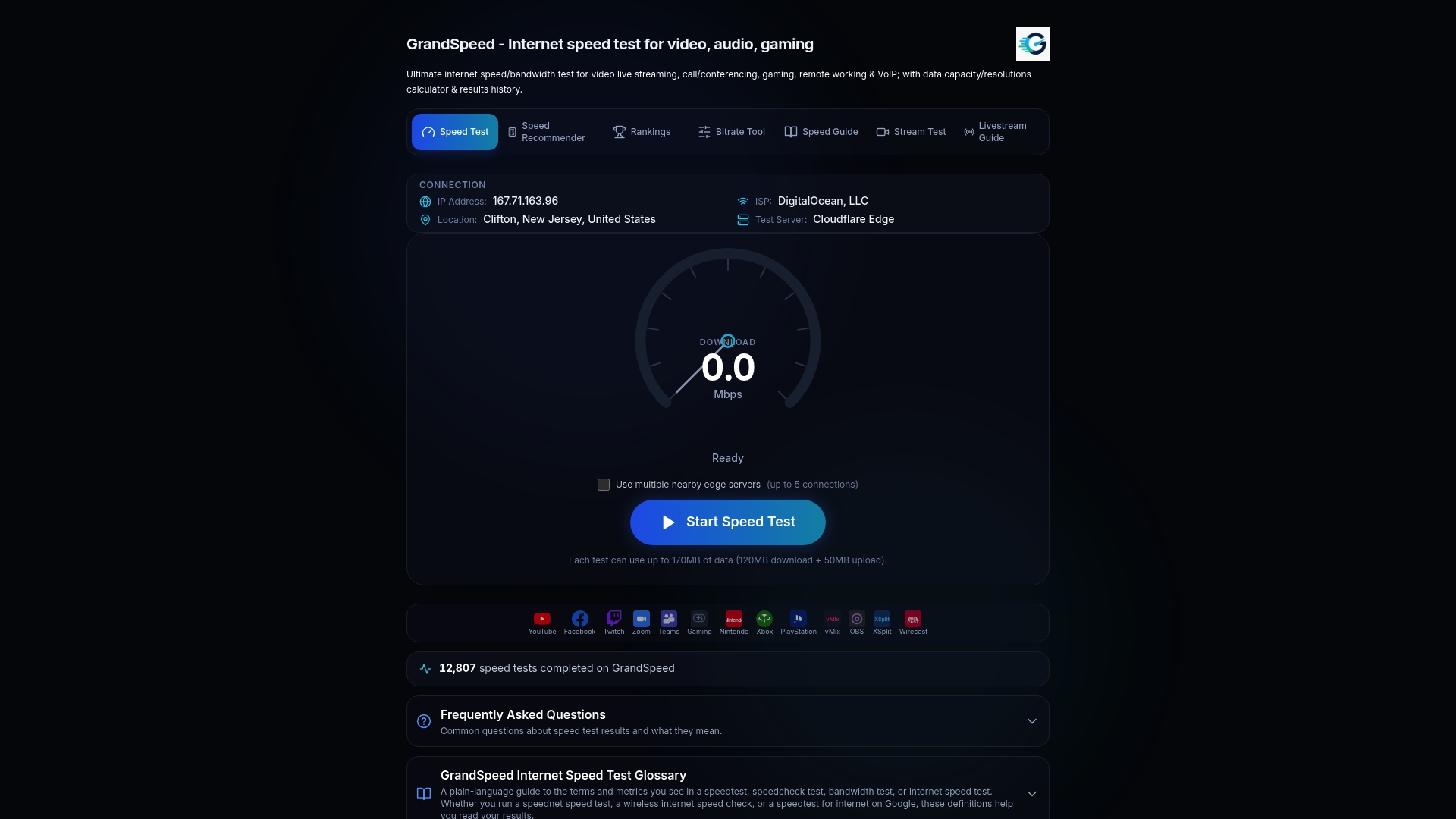
For streamers and broadcasters, our Stream Test goes further and reports the maximum broadcast resolution your connection currently supports, so you know exactly what settings to trust before you go live.
FAQ
What is the most accurate internet speed test?
No single test is universally the most accurate, since results depend on server selection, time of day, and whether a tool measures burst or sustained throughput. Tools that report latency, jitter, and packet loss alongside download and upload, such as GrandSpeed's Speed Test, give a fuller picture than throughput-only tools.
Is 100 Mbps a fast internet connection?
Yes, moderate to high download speeds comfortably cover multiple 4K streams, video calls, and typical browsing for most households at the same time. Whether it feels fast in practice still depends on latency, jitter, and how many devices are competing for that bandwidth at once.
Which is the best internet speed test site to use?
The best choice depends on what you need to know: basic throughput checks work for a quick look, but streaming, gaming, or remote work benefit from a tool that also reports latency, jitter, packet loss, and bufferbloat. Our Speed Test covers all of those in one in-browser run with no sign-up.
Is 500 Mbps considered very fast internet?
Yes, very high speeds are well above what a typical household needs, even with several 4K streams, video calls, and large downloads running simultaneously. At such speeds, the bottleneck is almost always local, such as an older router or Wi-Fi standard, rather than the plan itself.
Sources
These sources informed the methodology and thresholds referenced above. The FCC's Measuring Broadband America program explains the device-based testing approach behind national broadband data. The 2022 FCC Speed Test App technical description details server selection and test timing. The Measuring Broadband America report compares advertised versus measured speeds nationally. Cloudflare's Speed Test breakdown explains why loaded latency and packet loss matter alongside throughput.
- How does Cloudflare’s Speed Test really work? | Cloudflare Blog
- 2022 FCC Speed Test App technical description