
5G home internet handles casual gaming and most multiplayer sessions just fine, and it's often good enough for co op nights and ranked matches that don't demand frame perfect timing. Competitive gaming and eSports are where fiber still tends to win, mostly because wired connections stay more consistent under load. Before you decide anything, check three numbers: latency, jitter, and reliability. Those three tell you more than any advertised speed tier ever will.
TL;DR:
- 5G latency typically ranges from 20 to 40 milliseconds under normal conditions, but tower distance, obstructions, and congestion can increase delay and jitter significantly.
- fiber generally offers lower latency and more stable connections, making it the preferred choice for competitive gaming, especially when available nearby.
- Reliable gaming performance depends on achieving latency under 50ms, jitter below 5ms, and packet loss under 1 percent; exceeding these thresholds impacts responsiveness.
- Using Ethernet and optimizing gateway placement can substantially reduce ping and jitter, while high congestion or poor coverage may require plans with a static IP or fiber upgrade.
- Rural 5G deployments face higher latency due to tower distance and terrain, and urban areas experience sharper congestion spikes during peak hours, affecting consistent game performance.
Table of Contents
- Is 5G Good for Gaming? The Metrics That Actually Decide It
- Latency and Jitter on 5G: What to Expect and What Hurts Your Ping
- Speeds and Data Caps: What Advertised Mbps Actually Means for You
- Reliability and Coverage: Signal Types, Placement, and Disconnects
- CGNAT and NAT Types: Why Your Console Can't Find a Match
- Setup Fixes That Actually Lower Your Ping
- Should You Choose 5G, Fiber, or a Hybrid Setup?
- How to Measure Your 5G Gaming Readiness
- Urban vs Rural: The Gaming Experience Gap
- Security Considerations for Your 5G Gaming Setup
- Realistic Expectations for Competitive Gamers
- Diagnose Your Setup Before You Blame Your ISP
- Sources
- FAQ
Is 5G Good for Gaming? The Metrics That Actually Decide It
Forget the Mbps number on the box for a second. The stat that wrecks your K/D ratio isn't throughput, it's consistency, and that comes down to three measurements.
Latency is the time it takes a data packet to travel from your device to the game server and back, measured in milliseconds. Jitter is how much that latency wobbles from one packet to the next. Packet loss is the percentage of data that never arrives at all and has to be resent. A connection that averages 25ms but swings between 15ms and 90ms will feel worse in a firefight than one that sits steady at 35ms.
Here's how to read the numbers once you run a test:
- Under 20ms latency: excellent, competitive-grade
- 20 to 50ms: good to acceptable for most multiplayer games
- 50 to 100ms: playable, but you'll notice input delay in fast titles
- Jitter under 5ms and packet loss under 1%: the targets worth defending
Upload speed matters mainly if you're streaming your gameplay or hosting a match, not for how responsive the game itself feels. Download throughput affects patch and install times, not your in-match reaction window. The FCC's household broadband guide breaks down these definitions in more consumer-friendly detail if you want the fundamentals.
Latency and Jitter on 5G: What to Expect and What Hurts Your Ping
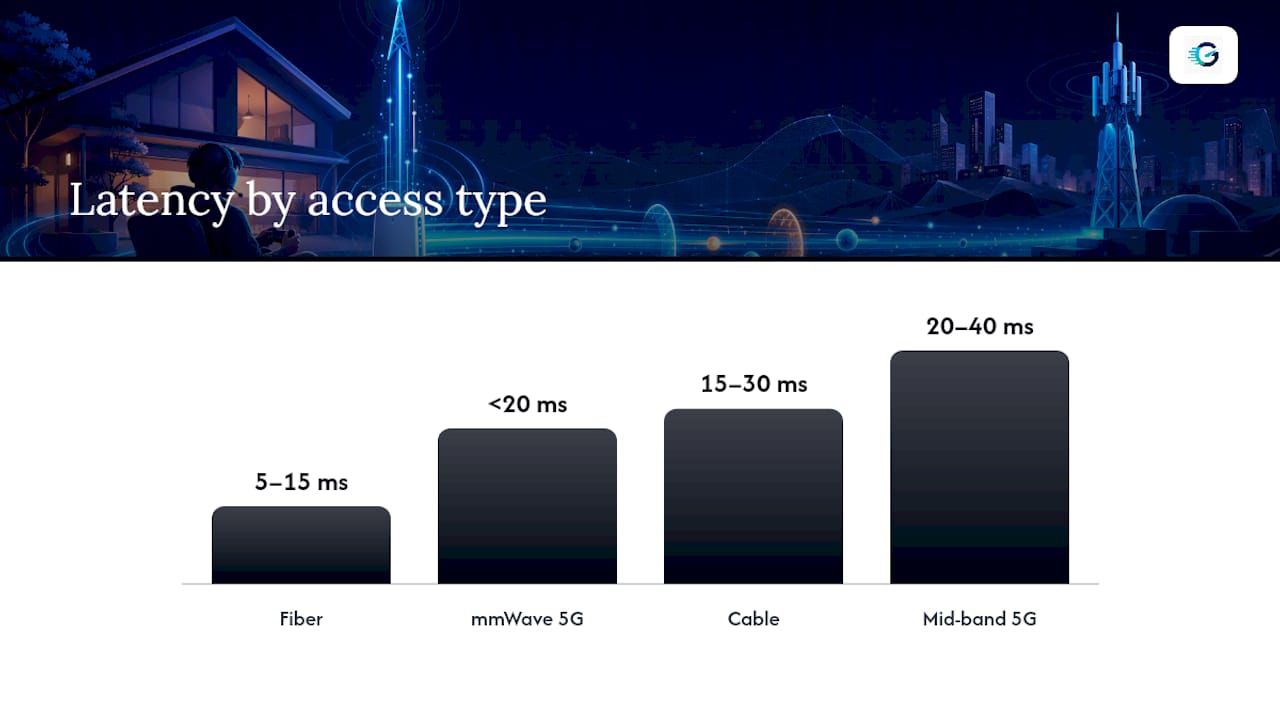
Mid-band 5G, the flavor most home internet plans run on, typically lands in the 20 to 40ms latency range under normal conditions. mmWave 5G can dip under 20ms in ideal, close-range setups, but its range is short enough that most home installations don't get that benefit consistently.
Compare that to wired options: fiber usually measures 5 to 15ms, and cable typically runs 15 to 30ms. 5G isn't embarrassing next to those numbers, but it's rarely the low bar either.
Where the spikes come from: tower distance is the biggest one. The farther your gateway sits from the nearest cell tower, the more your latency and jitter both climb. Physical obstructions, trees, hills, thick walls, add to that. Peak-hour congestion is another factor entirely, since 5G towers serve a shared pool of users, and your ping can jump noticeably between 4 PM and 10 PM when everyone in the neighborhood is streaming or gaming at once. Weather affects mmWave more than mid-band, and gateway placement inside your home, near a window versus buried in a closet, can swing latency by 10 to 15ms on its own.
Speeds and Data Caps: What Advertised Mbps Actually Means for You
Provider marketing pages tout speed tiers, but the number that matters for gaming isn't the peak, it's the median you actually get during a normal Tuesday evening. Verizon's 5G Home plans, for example, advertise ranges that shift depending on your address and tower load, which is standard across the industry.
What this means in practice:
- Large modern game installs run 50 to 150GB, so your realistic download speed determines whether a patch takes 10 minutes or an hour
- "Unlimited" data plans frequently include fair-use language that can deprioritize your traffic during network congestion, even though the plan technically has no hard cap
- Frequent patchers and multi-title households should read the fine print on deprioritization thresholds before assuming unlimited means unthrottled
A plan advertising 300 Mbps download might deliver half that at 8 PM on a Friday. That gap between advertised and measured speed is common enough that Grandspeed's speed guide exists specifically to help you figure out why your numbers don't match the label.
Reliability and Coverage: Signal Types, Placement, and Disconnects
A fixed 5G gateway sitting in one spot, plugged into a wall outlet, will always be more stable than a phone-based mobile hotspot, because the gateway can use a bigger antenna and doesn't move around your house losing signal every time you walk to the kitchen.
The three 5G band types trade off differently:
- Low-band covers wide areas and penetrates walls well, but tops out at modest speeds and doesn't always improve latency much over 4G
- Mid-band is the sweet spot most home plans use: decent speed, reasonable latency, solid coverage radius
- mmWave delivers the best peak numbers but has such short range that a tree between you and the small-cell antenna can kill the connection entirely
Practical checks worth doing before you commit to a plan: pull up a signal-strength app or your gateway's admin panel to see live signal bars, try relocating the gateway to a higher floor or a window facing the nearest tower, and bookmark your carrier's outage map so you can tell the difference between "my setup is bad" and "the network is down for everyone." BroadbandNow's assessment of fixed wireless notes it consistently beats satellite on both latency and reliability, which matters if your only other option is a satellite plan.
CGNAT and NAT Types: Why Your Console Can't Find a Match
Carrier-Grade NAT (CGNAT) is how many 5G home providers share a limited pool of public IP addresses across thousands of customers. It works fine for browsing, but it wreaks havoc on peer-to-peer game hosting, strict NAT types, and console party invites that suddenly stop working.
If matchmaking errors, failed invites, or "strict NAT" warnings are hitting you, work through these in order:
- Ask your carrier if a public or static IP add on is available, usually bundled with business tier plans
- Try a reputable gaming VPN that routes around CGNAT restrictions
- Check whether UPnP is enabled on your gateway, and test a DMZ setting for your console or PC if UPnP isn't cooperating
- Note that console platforms often show the NAT problem more visibly than PC, since Nintendo's own support documentation walks through nearly identical symptoms for slow speeds and connection errors
Pro Tip: Call your carrier and ask specifically for "CGNAT bypass" or a public IP add on. Frontline support reps don't always know the term, so ask to be escalated to technical support if the first answer is a flat no.
Setup Fixes That Actually Lower Your Ping
Most of the gain here isn't about your plan, it's about what's between the gateway and your controller.
- Run Ethernet, always. Wi-Fi adds variable latency and jitter that Ethernet simply doesn't have. If your console or PC is more than a room away, a long Ethernet cable still beats Wi-Fi for competitive play.
- Place the gateway smart. Near a window, elevated off the floor, away from metal appliances and thick walls. If your provider offers an external antenna or window mount, use it, since a few extra decibels of signal can shave real milliseconds off jitter.
- Tune the router. Enable Quality of Service (QoS) and prioritize your gaming device's traffic, keep firmware updated, and check for double NAT, which happens when your gateway and a secondary router are both trying to run NAT translation.
- Test after every change. One adjustment at a time, then retest, so you know what actually helped.
Pro Tip: Double NAT is sneaky. If you've got a mesh Wi-Fi system plugged into your 5G gateway, put the gateway in bridge mode so only one device handles NAT duties.
Should You Choose 5G, Fiber, or a Hybrid Setup?
- If fiber is available in your area and you play competitively, take it. Fiber remains the industry standard for competitive gaming for a reason: lower and more consistent latency across the board.
- If fiber isn't available, or it's priced out of reach, 5G home internet is a legitimate alternative, not a compromise you settle for out of desperation.
- If your realistic alternative is rural DSL or satellite, 5G usually wins outright on both latency and reliability.
- Consider a hybrid approach: sign up for 5G on a trial or month to month basis, run diagnostic tests across a week of normal usage, and switch to fiber or cable if your numbers consistently fall short of the thresholds covered earlier.
How to Measure Your 5G Gaming Readiness
Guessing wastes time. Running a proper test tells you exactly where you stand. Grandspeed's speed test measures the metrics that actually matter for gaming: latency, jitter, packet loss, bufferbloat, and DNS resolution time, plus download and upload throughput.
Run the test wired, not over Wi-Fi, so you're measuring your connection and not your router's radio performance. Repeat it at different times of day, morning, peak evening hours, and late night, since congestion patterns shift your numbers more than most people expect. Grandspeed keeps a test history so you can spot trends instead of judging your connection off a single lucky or unlucky run.
If your results land outside the thresholds from earlier, your next move depends on what's broken:
- High jitter, steady latency: reposition the gateway, check for double NAT
- High latency across all times: call your ISP about tower load or ask about a plan upgrade
- Consistently poor no matter what you try: it's time to look seriously at fiber
Urban vs Rural: The Gaming Experience Gap
City dwellers and rural gamers get genuinely different 5G experiences, and the gap is bigger than most marketing pages admit.
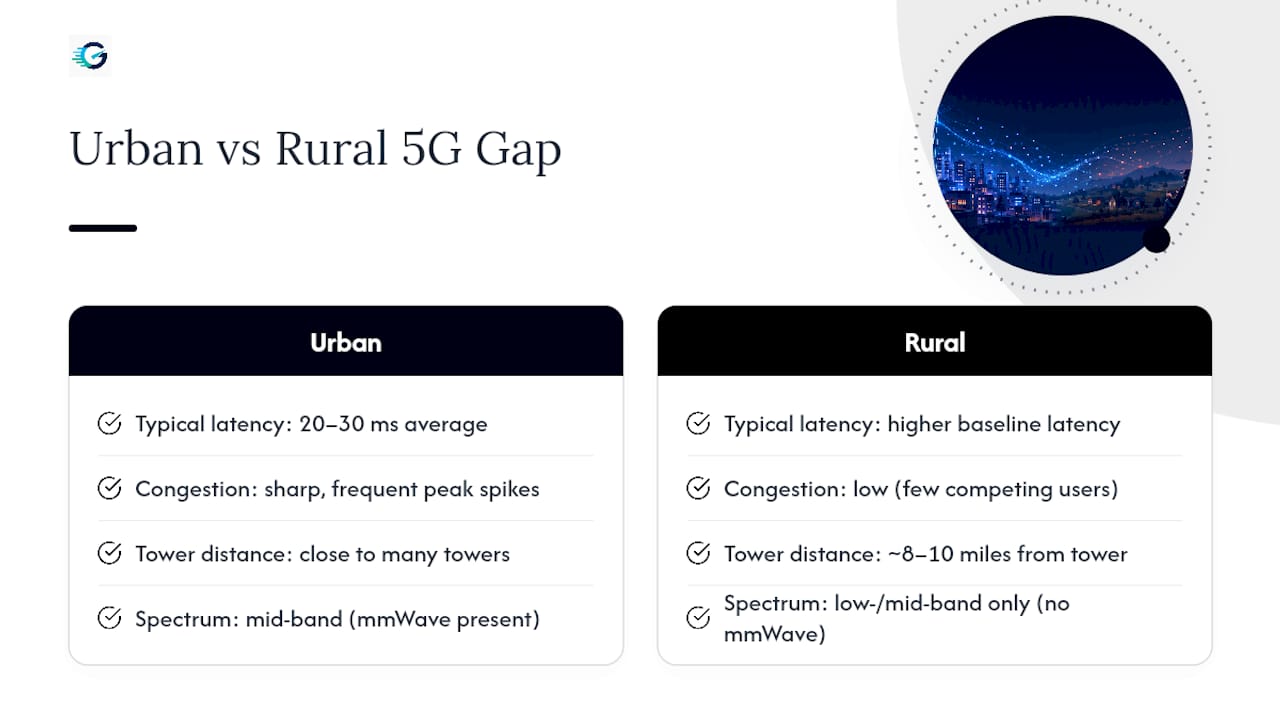
In dense urban areas, you're closer to more towers, which sounds like a win, but it also means more users competing for the same mid-band spectrum during peak hours. Latency tends to be lower on average, often in that 20 to 30ms range, but congestion spikes are sharper and more frequent. A downtown apartment might see excellent 8 AM performance and noticeably worse 9 PM performance, purely because thousands of neighbors are streaming and gaming at the same time you are.
Rural gamers face the opposite problem: fewer competing users, but much greater tower distance. You might be the only person on that particular cell sector, which keeps congestion low, but if you're 8 or 10 miles from the nearest tower, your baseline latency climbs and your signal strength becomes far more sensitive to weather and terrain. mmWave is essentially a non factor in rural deployments since carriers don't build the short-range infrastructure out that far. Low-band and mid-band do the heavy lifting instead, trading peak speed for reach.
The practical takeaway: urban gamers should test during peak hours specifically, since that's when problems show up, while rural gamers should focus more on signal strength and tower distance than on time-of-day patterns. Either way, the fix is the same, run the test, don't assume.
Security Considerations for Your 5G Gaming Setup
A 5G gateway is still a router, and it deserves the same security attention as any other home network device, arguably more, since gaming consoles and PCs are common targets for DDoS attacks during competitive matches.
Change the default admin password on your gateway immediately after setup. Most units ship with a printed default password that's often reused across thousands of units from the same carrier, which makes it an easy target if someone gets your gateway's local network name. Enable WPA3 encryption if your gateway supports it, and disable remote administration access unless you specifically need it, since that feature is a common entry point for attackers scanning for exposed routers.
If you opened UPnP or a DMZ setting to fix the CGNAT and matchmaking issues covered earlier, understand the tradeoff: DMZ in particular exposes a single device to the open internet with no firewall protection. That's fine for a console with modest attack surface, riskier for a full PC running background services. Consider setting up your gaming device on its own network segment or guest VLAN if your gateway supports it, so a compromised device can't reach the rest of your home network.
DDoS protection matters more on 5G specifically because CGNAT sometimes leaves you sharing an IP pool with other customers, meaning an attack aimed at "your" IP could actually be hitting several households at once. A VPN routes your gaming traffic through a different IP entirely, which is one of the more effective ways to keep your real address out of angry lobby chat threats.
Realistic Expectations for Competitive Gamers
Set a rule and stick to it: if your average latency sits above 40ms with jitter above 5ms after testing across several days and times, that's your signal to start shopping for fiber, not a reason to keep tweaking settings indefinitely. Measurement beats assumption every time. Test before you decide, not after you've already blamed your aim.
— Peter D
Diagnose Your Setup Before You Blame Your ISP
Switching providers is expensive and slow. Running a real diagnostic test takes two minutes and tells you whether the problem is actually your connection or something you can fix tonight. The speed test tool measures the exact metrics covered in this guide, latency, jitter, packet loss, and bitrate, so you're not guessing based on a generic speed number that doesn't reflect how games actually behave over your connection.
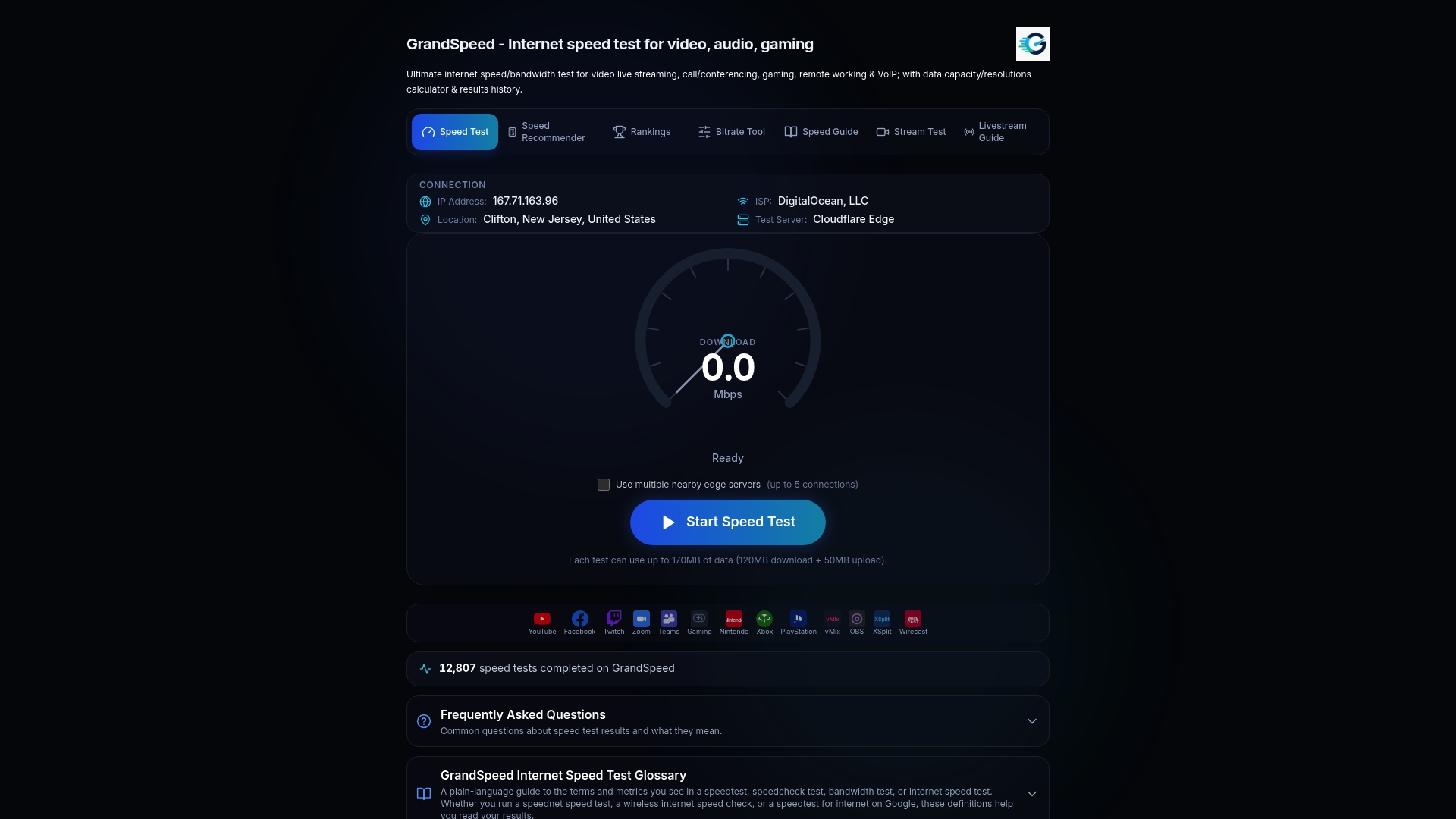
Run the Grandspeed over a wired connection, then compare your results against the thresholds above. If your jitter is high but latency is stable, reposition your gateway first. If everything's high across multiple time-of-day tests, that's your evidence to call your ISP about a business tier or public IP add on, or to start seriously pricing out fiber. Check your live streaming quality too if you plan to broadcast your matches, since that test reports the bitrate headroom your upload speed actually supports. Test it now, then decide with numbers instead of hunches.
Sources
- Reviews
- Household Broadband Guide — FCC
- Highspeedinternet
- 5G Home Internet — BroadbandNow
- 5G Home Internet — Verizon
FAQ
Is 5G Any Good for Gaming?
Yes, for casual and most multiplayer gaming, 5G home internet performs solidly, with mid-band latency typically in the 20 to 40ms range. Competitive and eSports level play still generally favors fiber's more consistent low latency.
What Is the Best 5G Router for Gaming?
The best choice is whatever fixed gateway your carrier provides that supports Ethernet output and external antenna options, since gateway placement and wired connections matter more than brand for actual gaming performance.
Is 5GHz Wi-Fi Good for Gaming?
The 5GHz Wi-Fi band (different from 5G cellular) offers lower interference and faster speeds than lower bands, but any Wi-Fi still introduces more latency and jitter than a wired Ethernet connection from your gateway to your console or PC.
How Long Will 5GB of Hotspot Data Last for Gaming?
Roughly 5GB covers many hours of actual gameplay data, since online gaming itself uses relatively little bandwidth, but a single game patch or install can consume that entire allowance in minutes.